Mac app · screenshots, markup and recording
PulseShot lets you mark up screenshots by talking
Hold a key, point at the screen and say what it needs. PulseShot plans the marks, shows you the list and applies them, on top of a full markup editor and a recording studio.
macOS 15 or later · Apple Silicon & Intel · 7-day Pro trial, no account · Signed and notarized by Apple
Screenshots that explain themselves
Felix Web Solutions Ltd is a one-person studio in London, and PulseShot is the third Mac app we publish under the FelixWeb name.
Marking up a screenshot usually means picking tools and dragging boxes. We wanted to point, say what it needs and check the plan, while keeping every mark editable and your captures on your Mac.
Made in London
Built and supported by one person at Felix Web Solutions Ltd.
No accounts
No analytics. Anything leaves your Mac only when you create a share link.
Simple to own
A free plan, a 7-day Pro trial, then one payment. No subscription.
Circle it.
Say it. Done.
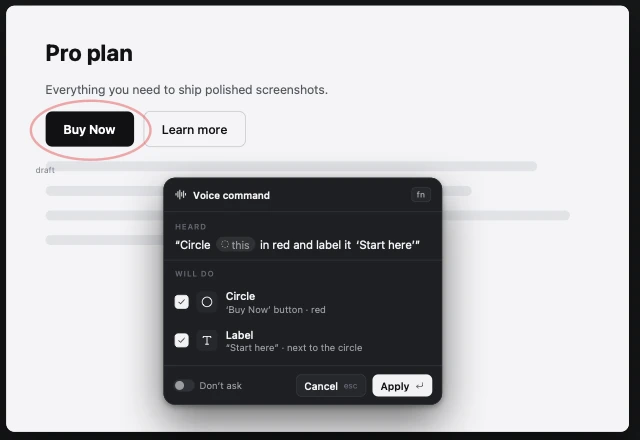
Voice Commander turns a spoken request into marks on your screenshot. It shows a plan first, so nothing lands without your say-so. It is a Pro feature.
Hold, point, speak
Hold a key, point at the screen and say what it needs.
See the plan first
A list of the marks it intends to add shows up before anything applies.
Still editable
Every mark stays a layer you can move or remove.
Fifteen tools, nothing baked until export
Markup editor
Fifteen tools, and every mark stays editable until export.
AI Markup
Describe what you want. Apple Intelligence or a local Gemma model plans it.
Smart Redaction
On-device OCR finds emails, phones, cards and addresses and covers them.
Library
Search captures by name or by the text inside them.
Share links
Uploaded to your own Cloudflare Worker, with optional expiry and password.
Captions
Export captions as SRT or VTT from the recording studio.
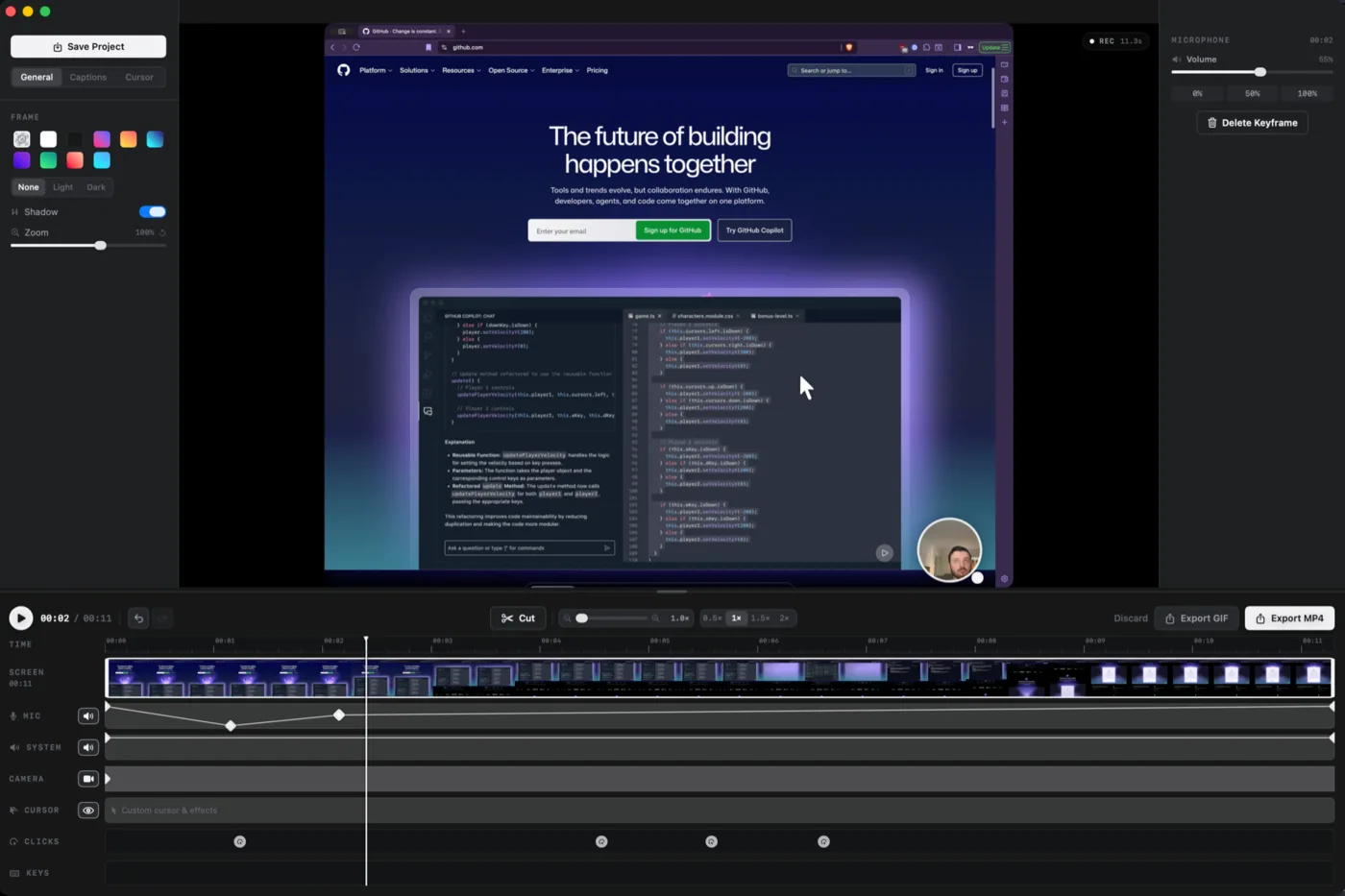
Record, then polish it
Edit zoom, cursor, clicks, keystrokes and captions on a timeline, then export MP4 or GIF. Basic recording is free and the full studio is part of Pro.
- Timeline
- Auto zoom
- Cursor effects
- Click effects
- Keystrokes
- Captions
Free to start, $19 for Pro
Every download includes a 7-day Pro trial with no card needed. Buy once when you are ready; there is no subscription.
Free
Forever$0
No card, no account
- Screenshots and the full markup editor
- Basic recording and studio
- MP4 up to 1080p
- PNG and JPEG export
- The library
- Felix’s pick
Pro
Launch priceWas $29now $19One-time purchase · 2 Macs · all 1.x updates
- Voice Commander and AI Markup
- Scan & Redact
- Advanced studio and AI captions
- 4K, 60fps, HEVC and GIF export
- WebP, HEIC and share links
A Pro licence covers 2 Macs and all 1.x updates. 14-day refund. $19 is a launch price, regular price $29.
A few quick answers
Yes. Every download includes a 7-day Pro trial with no card and no account. After that you keep the Free plan or upgrade once.
macOS 15 or later on Apple Silicon or Intel. The AI features need Apple Silicon. The app is signed and notarized by Apple.
No. Everything also works with the keyboard and mouse. Voice Commander is a Pro extra.
Only when you create a share link, which goes to your own Cloudflare Worker. There are no accounts or analytics. Update checks and optional model downloads are the only other network use.
No. It is $19 once as a launch price, then $29. One licence covers 2 Macs and all 1.x updates, with a 14-day refund.
Want the full picture? Head to the PulseShot site.
Downloads and every feature live at pulseshot.app. Get every Pro feature free for 7 days, then keep the Free plan or buy Pro once for $19.
macOS 15 or later · Signed and notarized · 14-day refund on Pro